Apple has to teach people how to use an iPhone again
Remember those introduction videos that Apple made to help people familiarize themselves with the original iPhone? In 2007, the company’s goal was to get users comfortable with interacting with a big (at the time) touchscreen and showing them slide to unlock. It’s been a long time since Apple has had any need to teach consumers how to use the iPhone again, but the removal of the home button and debut of Face ID are definitely big enough changes to warrant some new lessons.
Today Apple released “A Guided Tour” for the iPhone X, a video that clocks in at around 4 and a half minutes. In it, the company goes over all the basic gestures that buyers of the phone will perform daily such as swiping up to go home, swiping up and holding to launch the app switcher, quickly jumping between apps by swiping across the home indicator, and setting up Face ID.
The company is also encouraging people not to wait for Face ID to authenticate you before swiping up on the lock screen. “You can glance and swipe all in one motion.” If you do that, Face ID can often feel faster than Touch ID.
An Internet Archive capture of the old guided tour section for Apple’s original iPhone in 2007.
A lot of what’s covered is stuff that you might already know by now — even if you don’t have or plan to get an iPhone X, but there are a couple useful tidbits. I wasn’t aware that you can drag up an Animoji and drop it in as a sticker over any iMessage conversation.
Separately, if video walkthroughs aren’t your thing, Apple has also added support documents to its website covering all of these same essentials for Face ID and navigation gestures. There’s also a new page that covers the Super Retina OLED display, where Apple says that slight color shift and even minor burn-in over time are “expected behaviors” of OLED.
iPhone X iFixit teardown exposes Face ID, reveals two battery cells
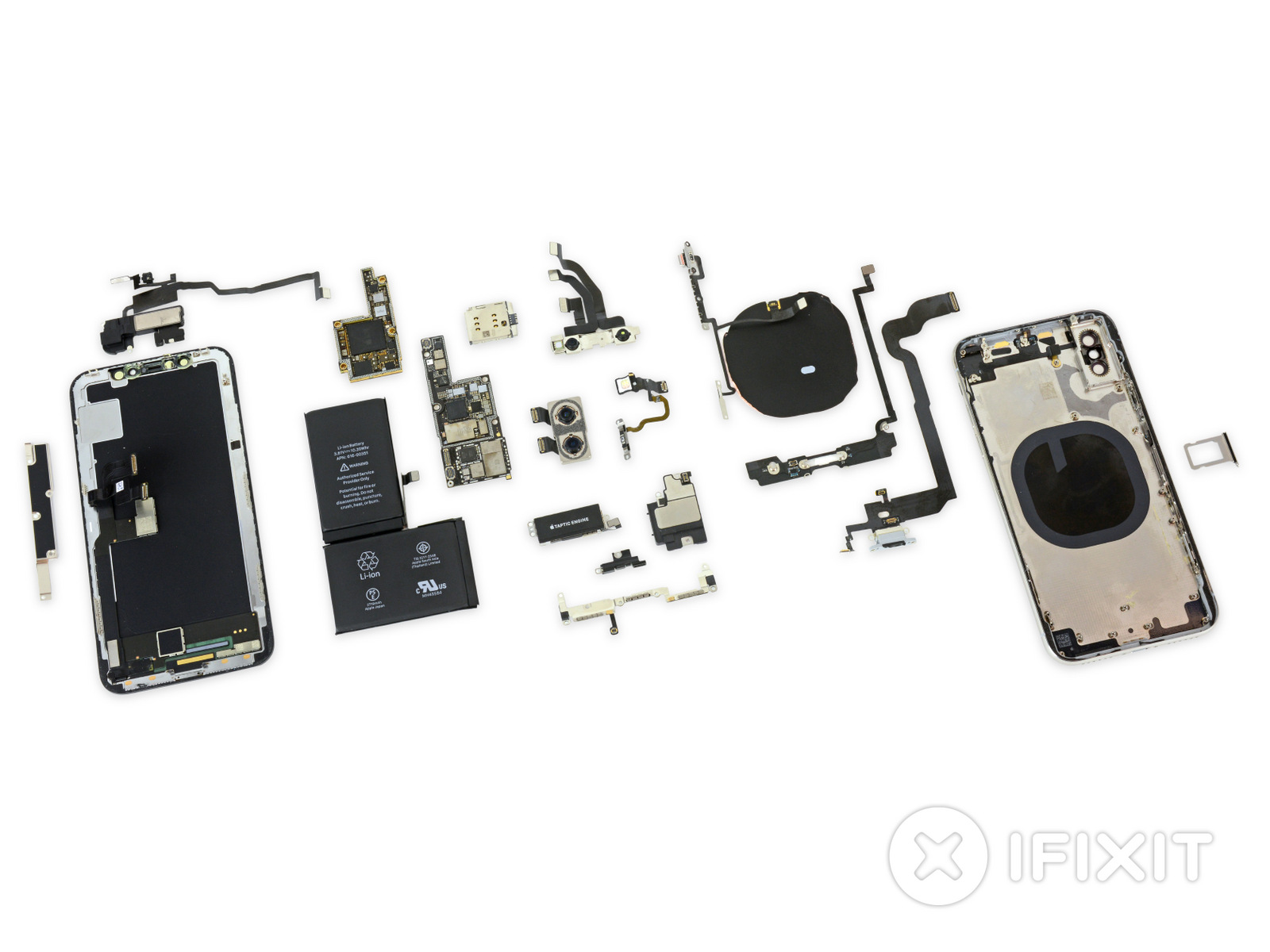
iFixit teardowns have been synonymous with iPhone launches, and today’s iPhone X teardown reveals how Apple has completely revamped the phone’s innards, figuring new ways to pack more features inside its very slim body.
The teardown reveals some surprises, including two battery cells in the iPhone X (a first in any iPhone model). The combined battery has a 2,716mAh capacity, which is slightly bigger than the battery found in the 8 Plus, which is 2,691mAh. iFixit says the iPhone X’s dual-cell battery design is more about saving space rather than changing the capacity of the battery itself. The two-cell design allows for more “creative shapes and placement,” and so Apple is able to take better advantage of leftover space.
Most of the phone’s real estate is taken up by this new dual-cell battery, and iFixit notes that the phone’s logic board has also shrunk quite a bit. The motherboard is 70 percent the size of the iPhone 8 Plus’, and Apple was able to fit more tech into that smaller space by folding the board in half. (The two halves are soldered together, iFixit states.) This is also the first double-stacked board in an iPhone, at least since the very first iPhone. Further, iFixit notes that when it tallied the total area of the separate layers, it amounted to 135 percent of the iPhone 8 Plus’ logic board area.
The teardown also reveals the sensors that make up Face ID, the new form of identification that replaces Touch ID on the iPhone X. A flood illuminator is embedded above the display, which projects infrared light onto the user’s face. The front camera then confirms a face. An IR dot projector in the far right of the device then projects a dot matrix over the face, creating a 3D map. Finally, the IR camera on the left of the display checks that map and sends corresponding data to your iPhone X, unlocking the phone.
The iPhone X components vs the first generation iPhonePhoto: iFixit
It’s also eye-opening to see how far the iPhone has come in 10 years — especially when you compare tear downs of the original first-generation iPhone to the iPhone X. The iPhone X has so much packed into the device, and there are more components, which have become noticeably smaller and more compact. iFixit says the density of the iPhone X’s “connectors and components is unprecedented.”
iFixit notes that display and battery repairs are still a priority in the design of the phone and that a cracked display can be replaced without removing any of the bio-metric Face ID components. The team warns that if the back glass breaks, though, “you’ll be removing every component and replacing the entire chassis.” The iPhone X gets a repair-ability score of 6 out of 10 making it a bit easier to repair than the Samsung Galaxy Note 8 (which scored 4) or the Essential Phone (1), but harder than the Google Pixel XL (7). Apple’s other flagship, the iPhone 8, scored a 6, too.
Duplicate files are one of the major problems in Windows PC and other data storage devices. Many times when we have low data storage capacity.
Especially if you use SSD in PC and laptop, you know the value of your data. Too many duplicates files grab your precious space in your hard disk. Nobody wants useless data in computer and mobile.
Here we give you amazing trick for finding duplicate file in your PC
We save lots of files in the computer and accidentally we also save duplicates files in the computer. Here we teach you how to find duplicates file in the computer and delete one by one.
Download CCleaner software for your Window PC, believe me, this is one of the best ways for finding duplicate files in your PC. CCleaner optimizes your PC for better performance. If you don’t know more about CCleaner read it from here Best Feature in CCleaner Software for Speed up Your PC
Duplicate Media Remover is the best app for finding duplicate media in android mobile. You can easily find duplicate photos and videos from this app. This app is simple and also free for all android mobile users.
How to Set Custom Lock Screen Shortcuts in Android Oreo
Lock Screen Shortcuts: The latest edition of Android Oreo includes a number of new functions and features. The Oreo beta version has many satisfied customers. It comes with smart features and the stable optimizations which are useful as well as fascinating. One of the most famous features of Android Oreo is the custom lock screen shortcuts. Using this feature, the users can include any sort of shortcuts on the oreo lock screen. So, you can use this feature for android o lock screen shortcuts. However, this exciting feature is not accessible for the official version of the AndroidOreo.
The current users of Oreo are expecting that the android oreo lock screen shortcuts in the official version, but we don’t know when it will be added. So, if you want to use the android 8.0 lock screenshortcut in the official version, then here is a simplistic method. If you are willing to use the feature, then here’s how to change lock screen shortcuts android o. The method is considerably easy, but you have to follow each step given below.
1. At first, you have to allow the developer’s mode or the USB debugging mode for modification. Visit Settings> System> Developer Options. Swipe the button to switch on the USB debugging mode.
How to Set Custom Lock Screen Shortcuts in Android Oreo
2. Now, download and install Package Names Viewer 2.0 which is a third-party app. It is free to download from Google Play store. In case if you are unable to locate this app then please download it directly from here.
How to Set Custom Lock Screen Shortcuts in Android Oreo
3. After downloading, start the app and you will find a list of all the apps on your Android phone. Beside each app name, you will notice an activity. Write the app details which you want in oreo lock screen notifications.
How to Set Custom Lock Screen Shortcuts in Android Oreo
4. Link your phone into PC via USB. Begin the ADB shell app on your PC. You have to download the app to your PC if you have not done earlier. Paste the code in the left widget turning it into lock screen- adb shell settings put secure sysui_keyguard_left “PACKAGE NAME/ACTIVITY NAME”. Displace the Package name and Activity name with the required app information. In the Right side shortcut- settings put secure sysui_keyguard_right “PACKAGE NAME/ACTIVITY NAME”. Once more, displace the Package Name and Activity name with the app details.
5. Now, you will observe that the left and right side section of the lock screen of your Android phoneis modified. If you want to repeat, then repeat linking to the ADB with debugger mode and paste the code. For left side- adb shell settings delete secure sysui_keyguard_left For Right Side- adb shell settings delete secure sysui_keyguard_right
How to Set Custom Lock Screen Shortcuts in Android Oreo
So, this was the method to Set Custom Lock Screen Shortcuts in Android Oreo. It is really a simple method which will add an additional feature in your device. You can also share this article with your friends so that they can also use this awesome feature.
JETBeam E40R Luminus SST40 LEDFlashlight USB Powered
JETBeam E40R: If you want to buy the best flashlight, then there is a product by Jetbeam. The E40r is a great EDC light to affix your turn. It has a good design and presents charming beam sounds and tone. It comes with a lanyard, USB charge cord, extra o-rings, instructions, warranty card and a nylon belt sheath. There is a charge port on the top, besides the electronic side button. It includes cool dark gray color with a blue stroke which looks good. It has strong pocket clip/lanyard addition and many more features so, let’s discuss some more features and specs of JETBeam E40R.
It accompanies SST-40 N4 BC LED along with maximum output 1150 lumens. It is built with mineral glass with a double-sided coating, professional aluminum alloy reflector, and professional electroplating technology. It utilizes huge powerful digital constant current circuit which can run about 270 hours. The IC digital circuit pattern of binary stability of LED and battery to increase the LED and battery durability. You can press to skip from the high, mid, low and ultra-low mode.
You can press the button two times to switch between turbo and strobe mode. It consists a built-in micro USB charging interface for the comfortable and secure way. You will observe a green indicator when the battery gets fully charged. The Aero-grade aluminum like separate tube assures prime strength and practice type III hard-anodized anti-abrasive coating. You will find an openhanded stainless steel bezel shields essential elements on the top.
JETBeam E40R is IPXX-8 waterproof which is works under 2m level and 1m impact-resistant. It features cooling ring which assures effective and furthers heat radiation in all ways. It packs a 3.7V 3400mAh 18650 battery which is installed in the flashlight to control the light. Youcan takes it for Biking, Camping, EDC, Hiking as well as Walking.
If you want to buy this JETBeam E40R Luminus SST40 LED Flashlight, then visit GearBest now. You can get it just at $62.95 in GearBest. You can use coupon: JE40R to get it just at $36.99.
WhatsApp Vulnerability: Do you have a WhatsApp account? If yes, then you should beware, as recently a vulnerability is found which could perhaps risk your privacy by exposing sensitive information of your way of working.
According to a computer science software specialist, Robert Heaton, with the help of a vulnerability in WhatsApp Web, the desktop version of the program, anyone can easily identify the everyday activity of users like when they sleep or wakes up, and even the person with whom the user is talking. He investigated that any Whatsapp user can easily identify other users chatting details.Heaton also claimed that anyone could misuse the vulnerability and obtain sensitive information regarding other WhatsApp victim while they are using PC. The limitation is that the bug remains in the tool “last hour of connection” which seems at above the chat window beside the title of the contact in question. It shows that data gets restored while the alterations are noted in an internal record of the application and simply obtain that through the list for makers of the browser.
New WhatsApp Vulnerability Allows To Track Your Friends And Strangers
With the benefit of information, Robert Heaton created a simple extension for Google Chrome based on JavaScript of just four strings of code, it enables managing the usage of the application of every contact, obtaining the said file in each ten-second interval. So, it could be likely to receive the guides of control of victims and also gain victim’s sleeping periods. It is possible only if we begin from the center that WhatsApp is habitually the ultimate app which we use every day and the earliest we notice after waking up.
New WhatsApp Vulnerability Allows To Track Your Friends And Strangers
Identifying your sleeping period is not that severe. Though, the same information from other users could be used to recognize if two contacts of the equivalent “circle” are chatting at a particular moment just by traversing both the data information. Heaton shows that anyone simply needs to form a pattern which correlates the user’s recent link to the contacts, to determine that the victim is probably chatting when the link occurrences are concurrent on various happenings. Inevitably, while conducting this spying, the two users to be observed should be in the contact list.
Sadly, it is the usual activity of the application, and not a failure, although it is doubtful that Facebook determines to solve the issue. Furthermore, various messaging apps available which include a late-connection logging operation similar to WhatsApp, this weakness could extend in others such as Messenger or Telegram.
How to Enable Google Dialer New Floating Bubble Feature
Floating Bubble: Google is always trying new features for their users. Google has an amazing feature the new portable dialer. This feature helps those people, who are satisfied in multitasking including calls. You can also accept calls in between your works. Many developers are planning to make calls more comfortable which set the network. The Google Dialer floating has taken all the attention of people, and hence it is one of the best features of Google. All the Android users can take the advantage of this feature, but this system utilization is not available on every device. There are some people who don’t know how they will set on their Android. You can install Google dialer Android OPixel Launcher on Marshmallow and Nougat. You don’t have to worry, with the help of this article you will get the full information about the characteristic. 1) The first thing, you have to download the app from Google dialer play store and complete the installation from the Unknown Sources from Android setting. After that download the Google Dialer app on your device using the Internet.
2) This dialer app is linked as a default dialer of the device. You can fix it as an icon from the app drawer but remember it will not be counted as the default app. If you want to make it a default app then go to the Settings > Apps. In apps click on Gear icon present on the top of setting screen. You will get the new screen or the panel for configuration of apps.
How to Enable Google Dialer New Floating Bubble Feature
3) Select the Phone app option and then choose the Google Dialer to make the default app. Now close the apps and open File Explorer that allow the Root passage to the device.
How to Enable Google Dialer New Floating Bubble Feature
4) Now open the XML file in the higher section which you have to edit it will be a text programming then watch for the G_enable_return_to_call_bubble boolean then change the value to true instead of the default value of false. after all the changes save the file.
5) Then forcefully stop the dialer app and then restart it again using the steps, Settings > Apps > Phone. Now you are free to use the Google Dialer floating functions without any problems.
So this method will help you to enable Google dialer’s new floating bubble feature in your device. You can get Google dialer APK mirror and update Android 6.0. Google dialer for Samsung is also accessible. You will find it very comfortable in handling the calls. Read this article and share the idea with your friends and make your Android a handy phone for yourself.
/cdn.vox-cdn.com/uploads/chorus_asset/file/9604319/Screen_Shot_2017_11_03_at_4.40.27_PM.png)

/cdn.vox-cdn.com/uploads/chorus_image/image/57451889/GVZVZRp1qgFea3Zs.0.jpeg)
/cdn.vox-cdn.com/uploads/chorus_asset/file/9600107/NVwTUohZkJOX1Hii.jpg)